|
- The latest version
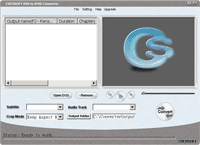
includes two running modes, one is "Direct Mode", the other is "Batch
Mode".
- --"Direct Mode" means that user can directly click
the DVD Menu to select the movie they want to rip. This mode is very easy for
ripping a movie DVD's.
--"Batch Mode" means that user can select
the DVD titles/chapters they want to rip via checkbox list. This mode is very
easy for batch ripping Music DVD's, MTV DVD's and Episodic DVD's. - Support
almost all kinds of DVD to iPod format
- Support for Subtitle Selection,
eg. English Subtitle, French Subtitle ....
--Under "Direct Mode",
through DVD menu.
--Under "Batch Mode", through DVD Title list.
- Support for Audio Track Selection, eg. English audio track, French audio
track.....
--Under "Direct Mode", through DVD menu.
--Under "Batch
Mode", through DVD Title list. - Various kinds of video crop mode.
eg. 16:9, 4:3, full screen and so on.
- Various kinds of video resize mode,
eg. "Keep aspect ratio" and "stretch to fix screen".
- Support
splitting output video by DVD chapters, and titles. Fully support MTV DVDs and
Episodic DVDs.
- Support customize output video file size and video quality.
- Provide flexible output profiles, user can easily customize the video
properties.
- Support DVD to MP3 audio conversion.
- Support Dolby,
DTS Surround audio track.
- Support Apple TV as well.
- Support
latest iPod touch and iPod video nano.
|