MP3ToWAV.ORGHomeSearch MP3ToWAV.ORGSoftware DirectoryTechnical CenterContact MP3ToWAV.ORG
Today's Pick
iPod Video Converter Suite
Editor Pick - iPod Video Converter Suite
an all-in-one iPod video Conversion solution + DVD to iPod
The 6th generation DVD to iPod Converter released
Paypal available
Now Available - PayPal as Customer Payment Option
Windows Product
 
Mobile Video(New)
iPhone Video Converter Suite
DVD to Mobile Video Suite
3GP Video Cnverter
 
DVD to iPod
iPod Video Converter Suite
DVD to iPod Converter
DVD to MP4 Converter
WinAVI iPod/PSP/3GP/MP4 Video Converter
 
Mobile Music
iPhone Video Converter Suite
Audio To Midi
Mobile Music Polyphonic
Mobile Music Pro
RingTone Converter
Polyphonic Wizard
 
MP3 to WAV
MP3 WAV Converter
Audio Converter
Cool MP3 Converter
 
Video to iPod
iPod Video Converter Suite
WinXMedia AVI/MPEG iPod Converter
iPod Movie Converter
AVI/MPEG iPod Converter
 
MP3/WAV to MIDI
Audio To Midi
Mobile Music Polyphonic
IntelliScore Polyphonic
 
Ra/RM/RAM to MP3
RA to MP3/WAV Converter
Audio Mid Recorder
 
DVD Ripper
Isofter DVD Ripper Deluxe
WinXMedia DVD Ripper
DVD to MP4 Converter
 
DVD Burner
DVD-Cloner IV
DVD Santa
DVD Duplication
DVD Clone Studio
DUP-DVD
 
Video Converter
WinAVI Video Converter
AVS Video Tools
Video Converter
ImTOO MP4 Video Converter
 
Midi to WAV
MID Converter
Audio Mid Recorder
Sound Recorder XP
 
Midi to MP3
MID Converter
Audio Mid Recorder
Sound Recorder XP
 
RM to MP3
Audio Converter
Real Converter
 
MP3 to RM
MP3 RM Converter
Audio Converter
Real Converter
 
WAV to MP3
MP3 WAV Converter
Audio Converter
WAV MP3 Converter
 
All-in-One
Blaze Media Pro
Virtuosa Gold
CD-DA Extractor
 
Burn Audio CD
Audio CD Burner
Audio CD Maker
Media Convert
 
Burn MP3 CD
AVS Audio Tools
Xilisoft MP3 CD Burner
Virtuosa Gold
Audio CD Maker
 
CD to MP3
Free CD Ripper
CD to MP3 WAV Maker
Audio Converter
CD Ripper
 
Audio Recorder
Audio Mid Recorder
Audio Record Wizard
EZ MP3 Recorder
Sound Recorder
 
WMA to MP3
Audio Converter
Blaze MediaConvert
Audio Mid Recorder
 
Music files Search
Mp3 Explorer
P2P Music Jukebox
 
CD to WAV
Audio Converter
Easy CD Ripper
Easy CD-DA Extractor
CD to MP3 WAV Maker
 
MP3 to RM
MP3 RM Converter
ALO Audio Center
CD To RM Ripper
Real Converter
 
MP3 Management
Organizer MP3
Virtuosa Gold
Moderal Jukebox
Media Box MP3 Workstation
MP3 Tag Clinic
 
MP3 Sound Editor
MIDI Maestro
Audio Editor
AudioEdit Deluxe
 
MP3 Tag Editor
Audio Converter
Ultra Tag Editor
MP3 Tag Clinic
 
Other Tools
Cool Paint
AV VoizGame
HiDownload Pro
Backup Plus
SubmitWolf
Linux Product
All-in-One
Gear PRO for Linux
Mac Product
DVD to iPod Converter for Mac
iPod Video Converter for Mac
RingTone Converter
Security Software
Spyware Doctor
Registry Mechanic
Spam Monitor
 
Audio Mid RecorderEditor's Choice
1. Introduction
2. What can Audio Mid Recorder do?
3. Recording Tutorial
4. Main Interface
5. Options Setting
6. Using Schedule
7. Using Wizard
8. Using ID3 Tag Editor
 

Recording Tutorial - Using a Sound Card Mixer for Windows

Recording with Audio Mid Recorder

Tip

  • You might be able to convert your sound card to a DirectSound-compatible full-duplex sound card by installing the latest version of the sound driver for your sound card. Contact the manufacturer of your sound card to inquire about how to obtain and install the latest version of the sound driver for your sound card.

Using a Sound Card Mixer for Windows

If you cannot locate your sound card as an input device in Audio Mid Recorder, you can use the Windows Volume Control instead.

  1. In the Taskbar tray, in the lower right corner of the computer screen, double-click the speaker icon. The Volume Control dialog box appears.

    Tips

    • If you do not have a speaker icon in your taskbar tray, you can display the Recording Control directly.
    • To display it in Windows 98 or ME, click Start > Settings > Control Panel. You can then click Sounds and Multimedia. On the Audio tab of the Sounds and Multimedia dialog box, click the Volume button in the Sound Playback group.
    • In Windows XP, click Start > Control Panel. Click the Sounds and Audio icon. On the Audio tab of the Sounds and Audio Devices Properties dialog box, click Volume.
  2. You can control which sound card speaker-input controls appear in the Volume Control window. In the Volume Control window, click Options > Properties.
  3. Select the controls that you want to appear.
  4. For each speaker-input shown, you can see a Volume slider and Mute checkbox, and perhaps other controls for balance, and so forth. The Volume slider controls the loudness for that particular speaker input and Mute turns it off completely.

    Tip

    • The Volume Control dialog box only sets options for speaker output and does not control recording. Do not clear the checkbox for the Microphone Mute control and turn up the microphone volume. If you do this, the programcannot record from the microphone.
  5. Click Options > Properties again.
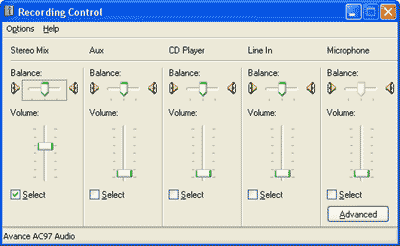
  6. Select Recording and select all the controls. The Volume Control dialog box is replaced by Record Control.
  7. For each recording input, you can click a Select checkbox and adjust Volume slider. Do one of the following:
    • If you want to record from the microphone, check the Microphone Select checkbox.
    • If you want to record from Line-In, select the Line-In Select checkbox.
  8. If the recording volume is too low, turn up the appropriate Volume slider.

    Tip

    • Sometimes you might wish to record streaming audio. Many modern sound cards present a recording input called Wave (Stereo mixer) that may work. Several sound cards also offer a recording input called What U Hear or a similar name, that records anything that can be heard over the computer speakers.
 
Highlight
Highlight - Video Converter
Video Converter
WinAVI Video Converter support almost all formats of video including AVI, MPEG1/2/4, VCD/SVCD/DVD, DivX, XVid, ASF, WMV, RM, QuickTime MOV, Flash SWF. Also, it allows you to burn to VCD/SVCD/DVD. A powerful AV compress engine can complete a whole AVI movie conversion and burn it to DVD just in 1 hour.
Convert, split, join, remove commercials, edit, rotate, apply effects, capture, transfer, copy, rip and burn DVD and video files!
Most Popular
1.iPod Video Converter Suite
2.Audio Mid Recorder
3.WinAVI Video Converter
4.iPod Movie Video Converter
5.Audio To MIDI
6.MP3 WAV Converter
7.DVD Santa
8.DVD-Cloner IV
9.iPod Video Converter for Mac
10.PSP Video Converter
Just In
Video Charge is an extremely powerful easy-to-use video, audio, and image editing and conversion tool.
 
Video Conversion Expert - Batch Convert MPEG (DVD, VCD, SVCD, MPEG1, MPEG2), AVI (DIVX, XVID, MPEG4...), RM/RMVB, WMV/ASF to various formats.
 
Video Audio Joiner Splitter - Join AVI to MPEG movies.
Join MPEG to AVI movies.
Join videos of various size and frame rate with still images.
Save your joined video as a new AVI or MPEG movie.
 
Video Converter can convert video format( avi, mpg, mov, rm ) to VCD, DVD, SVCD, support NTSC, PAL modes.
 
Video Converter for Mac, the powerful conversion software can perform video and audio conversions and extract audio from video files.
 
Video to Audio Converter is an extremely easy-to-use tool to extract audio from AVI, WMV, ASF, MPG and MPEG files to MP3, WAV, WMA and OGG format.
 
Video to MP4 Converter converts video formats including DivX, VOB, VCD, DV, H.264/MPEG-4 AVC, H.264/PSP AVC, MPEG, 3GP, 3G2, Animated GIF, AVI, MOV, MP4, RM, WMV to MP4, and audio formats like AC3, WMA, MP2, MP3, OGG, AAC, WAV, APE, CUE, CDA and M4A files into M4A, AAC and MP3.
 
Virtual Cover Creator is a 3D cover creator software that helps you create stunning, unlimited 3D covers for your ebook, software box, CDs, special reports, two or three sided boxes, electronic magazines and more.
 
Virtuosa Gold - DISCOVER VIRTUOSA, the most spectacular music and movie jukebox on the planet !
 
Visual MP3 is an excellent music management tool that can organize your MP3 files, play them back, rip CDs, edit ID3 tags, rename your MP3s in batches, and search for lyrics online.
 
Visual MP3 CD Burner is an easy to use audio CD burning software that offers on-the-fly MP3, MP2, WAV, OGG and WMA CD burning.
 
Wave Pad is a sound editor program for Windows. This software lets you make and edit voice and other audio recordings.
 
WAV MP3 Converter supports batch conversion between MP3, WAV, WMA and OGG.
 
Music Recognition Pro - WAVE to MIDI, MP3 to MIDI, CD to MID : Recorded music can be converted into score!
 
WinAVI iPod/PSP/3GP/MP4 Video Converter is software for MP4/3GP file conversion of portable video device such as iPod/PSP
 
WinAVI Video Converter is the fastest video convert solution in the world. It is also a ALL-IN-ONE solution for video file converting and burning.
 
WinMPG Video Convert is a complete solution for video file converting. It supports conversion AVI to Mpeg1, AVI to Mpeg2, AVI to DVD, AVI to VCD, AVI to SVCD, all media format to DivX, and all to AVI.
 
Ultra-Dvd2Mp3 is a DVD Audio Ripper. it provides a simple, fast method to extract DVD audio and save as Mp3 format.
 
Ultra Tag Editor is a powerful and easy-to-use mp3 tag editor with many useful features.
 
Audio To MIDI creates MIDI sequences from WAV/MP3/CD tracks, also in realtime.
 
The Palette - Melody Composing Tool is a tool for the creation of 'theoretically correct' melodies.
 
TV Software allows you to view regular dish channels from any location in the world. Download TV Software to your laptop and watch from a wide range of satellite stations anywhere you go.
 
1Click DV to DVD is stable, fast, ease-to-use DV to DVD converter which provides the simplest way to convert and transfer Mini DV, DV to DVD-Video disc with excellent quality and the fastest speed.
 
Xilisoft Apple TV Video Converter is powerful and super fast Apple TV video and Apple TV movie converter software which provides a very easy and competed way to convert Apple TV Video from all popular video files with great quality.
 
Xilisoft DVD to Apple TV Converter is powerful, easy-to-use DVD to Apple TV Converter software which helps you convert DVD to Apple TV video MP4, MPEG-4, Apple TV audio MP3, AAC, WAV and put DVD on Apple TV with super fast speed and perfect quality!
Site Links
Home | Search | Directories | New Release | Tech Center | Contact US
©2002 - 2007 MP3 TO WAV.ORG